
Bageto (Tom B.) - 08/02/2026
1. Historical context & why Win32 still matters#
Origins of the Win32 API#
The Win32 API was introduced with Windows NT in the early 1990s to provide a standardized development interface for application developers. At the time, this was a major step forward: it abstracted the complexity of the kernel and system calls, allowing applications to run across different Windows versions without requiring significant changes.
This abstraction layer played a key role in the long-term stability of the Windows ecosystem and strongly contributed to its adoption in enterprise environments.
Why Win32 is still relevant today#
Despite the arrival of modern frameworks such as .NET, UWP, or WinUI, the Win32 API remains deeply embedded in Windows. Thousands of legacy applications, system tools, and security products still rely on it directly.
Even modern frameworks often end up calling Win32 under the hood for low-level operations such as process management, memory handling, or input/output. For anyone working in security, reverse engineering, or malware analysis, understanding Win32 is therefore still essential.
Privilege levels and execution context#
x86 and x64 processors define four privilege levels, known as rings, which control access to memory and sensitive CPU operations. In practice, modern operating systems only use two of them.
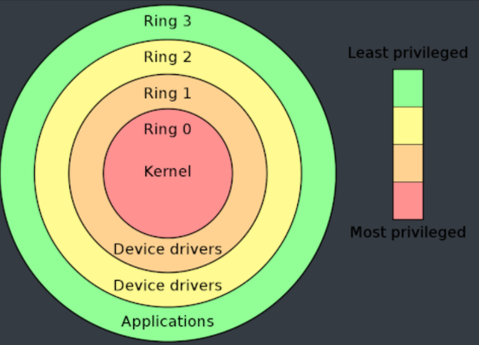
On Windows, Ring 0 corresponds to kernel mode, where the kernel and device drivers execute. Ring 3 corresponds to user mode, where almost all applications run. The vast majority of user activity takes place entirely in Ring 3.
Some operations require interaction with the kernel. In those cases, applications rely on controlled mechanisms exposed through specific APIs to temporarily transition into kernel mode, without ever gaining direct access to Ring 0.
Rings 1 and 2 are mostly theoretical today and are not used by modern operating systems.
A brief historical note#
As a historical curiosity, one of the last operating systems to make real use of multiple privilege rings beyond Ring 0 and Ring 3 was Multics, developed in the 1970s. Multics implemented up to eight rings to achieve fine-grained privilege separation and was far ahead of its time in terms of security design.
Although Multics is now purely historical, many of its ideas influenced modern operating systems. The last known Multics system was shut down in 2000 at the Canadian Department of National Defence.
2. Inside Win32 API: Architecture, security & key functions#
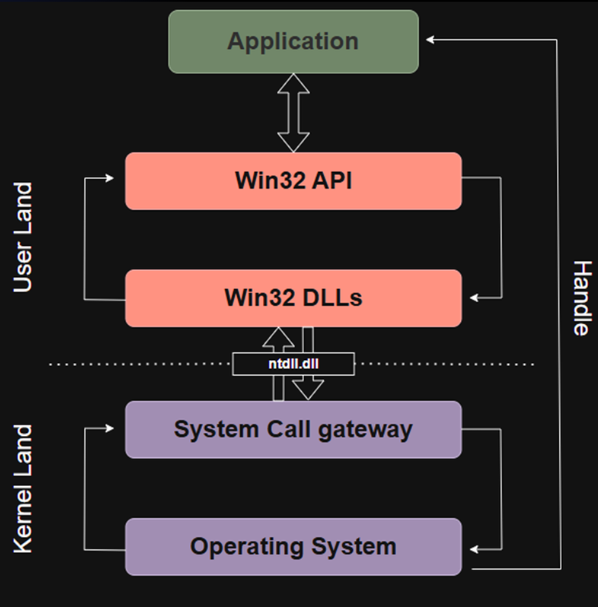
Application (User Mode)#
The application is the program you write in C, C++, C#, Python, or any other language, as long as it relies on the Windows API. A key point to understand is that an application never communicates directly with the kernel.
It runs entirely in user mode (also called User Land), which means it has no direct access to hardware, memory management, or privileged CPU instructions.
When an application needs to perform a sensitive operation, such as creating a file, opening a socket, or accessing another process, it cannot do so on its own. It must go through the Windows API. The application simply invokes exposed functions, and everything else happens deeper in the system stack.
Win32 API#
Just below the application sits the Win32 API. This is the large collection of functions Windows exposes to developers (thousands of them) such as CreateFile, ReadFile, CreateProcess, or MessageBox.
Whenever an application wants to perform a system-level action, it does so by calling one of these Win32 functions. However, calling a Win32 API function does not mean the kernel is contacted directly.
The Win32 API acts as an abstraction layer: it provides developer-friendly functions while hiding the complexity of low-level system interactions. Internally, these calls are forwarded to system libraries that handle the next steps.
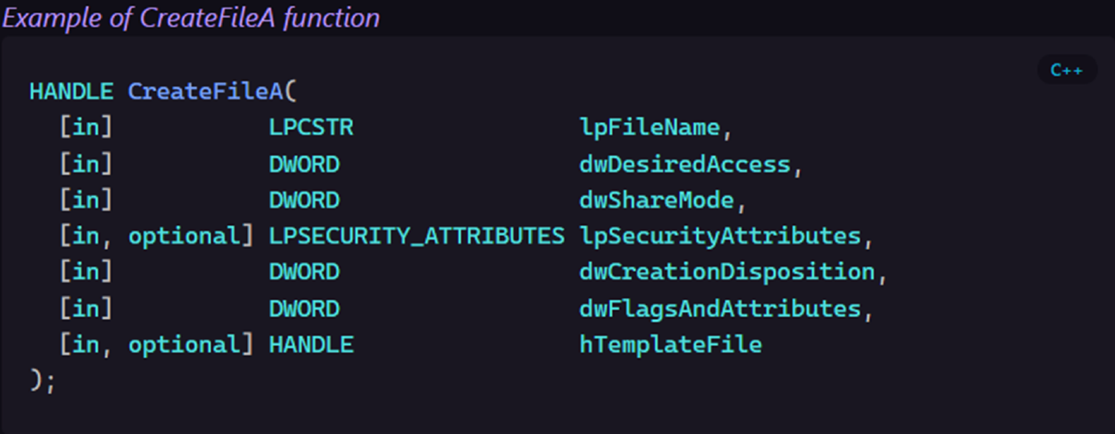
Example of CreatFileA function
Win32 DLLs#
Below the Win32 API lies the layer of Win32 system DLLs. Common examples include kernel32.dll, user32.dll, gdi32.dll, and advapi32.dll.
These DLLs are responsible for implementing the actual behavior behind Win32 API calls. They translate high-level API calls into lower-level operations.
For example, when CreateFile is called:
- the request starts at the Win32 API level,
- is handled by
kernel32.dll, - and eventually reaches a lower-level function implemented in
ntdll.dll.
Only at this stage does the system prepare to cross the boundary between user mode and kernel mode.
System Call Gateway#
This is where execution officially leaves user mode and enters kernel mode. The transition occurs through a system call (or syscall), which is the only legitimate way to cross this boundary.
The ntdll.dll library plays a central role here. It contains internal functions that trigger syscalls and switch the CPU execution context from Ring 3 (user mode) to Ring 0 (kernel mode).
Applications never invoke syscalls directly. This mechanism is tightly controlled to ensure system stability and security.
Operating System (Kernel)#
At the bottom of the chain lies the Windows kernel itself, implemented in ntoskrnl.exe. This is where the requested operation is truly executed.
The kernel manages critical system resources such as CPU scheduling, memory, disk access, and communication with device drivers. It performs all necessary security checks and decides whether the requested operation is allowed.
If the operation succeeds for example, creating a file or opening a process, the kernel returns a handle. This handle is a reference that the application can later use to interact with the object it created or opened.
Role of ntdll.dll in system calls#
The ntdll.dll library plays a critical role in the Windows execution model. It is often referred to as the Windows NT layer, and it sits at the very bottom of user mode, right before the kernel boundary.
Unlike other Win32 DLLs, ntdll.dll exposes native system call implementations, such as NtCreateFile, NtReadFile, or NtQueryInformationProcess. These functions are not meant to be used directly by applications, but they form the final user-mode step before entering kernel mode.
When an application calls a high-level function like CreateFileA, the request flows through the Win32 API and system DLLs such as kernel32.dll. At some point, this call is translated into its native equivalent and forwarded to ntdll.dll.
At this stage, ntdll.dll is responsible for triggering the actual system call. It executes a controlled CPU instruction (syscall) that switches execution from user mode (Ring 3) to kernel mode (Ring 0). From there, the Windows kernel performs the real operation, such as creating the file on disk.
This design makes ntdll.dll a key component in Windows internals, but also a frequent focus in reverse engineering, malware development, and security research, since it represents the narrow gateway between userland code and the kernel.
Design philosophy behind Win32 API#
The Win32 API was designed by Microsoft to provide developers with a simple, stable, and long-lasting interface. The core idea is that applications should always rely on the same high-level functions (such as CreateFile) even if Windows completely changes how these operations are implemented internally.
This design is what guarantees strong application isolation. As long as software uses the Win32 API, it never needs to care about internal kernel changes or modifications to the Native API. Windows can redesign its internal architecture, optimize system calls, or refactor kernel components without breaking existing applications.
Another key goal of Win32 is backward and forward compatibility. Microsoft can evolve Windows across major versions; from Windows 7 to Windows 10, 11, and beyond, without requiring applications to be rewritten. From the developer’s perspective, the API remains the same: only the internal implementation changes.
This abstraction also enables compatibility across different execution environments. A typical example is WOW64, which allows 32-bit applications to run on 64-bit systems. Even though these environments are fundamentally different, applications remain unaware of it, because the Win32 API transparently handles the adaptation.
In practice, this design provides compatibility, portability, and security. Most importantly, it allows Windows to evolve internally while continuing to run applications that are sometimes more than 20 years old.

WOW64#
WOW64 is a compatibility layer built into all 64-bit versions of Windows. Its purpose is to allow 32-bit applications to run without any modification on a 64-bit operating system.
In practice, WOW64 intercepts Win32 calls made by a 32-bit application and translates them so they can be safely executed by the 64-bit kernel. It also handles all required conversions behind the scenes, including pointers, data structures, and certain architecture-specific behaviors.
This mechanism is one of the key reasons Microsoft was able to transition Windows to 64-bit without breaking millions of existing applications.
A common source of confusion around WOW64 is the System32 directory. This folder has existed since Windows 95, long before 64-bit Windows. When Microsoft introduced 64-bit systems, renaming it to something like System64 was not an option, as countless applications or even parts of Windows itself had the path hardcoded.
As a result, System32 actually contains 64-bit system binaries and DLLs, while 32-bit binaries are stored in the SysWOW64 directory. WOW64 automatically redirects 32-bit applications to the appropriate 32-bit libraries, making the entire process transparent to the application.

System32 = 64-bit dlls repository

SysWOW64 = 32-bit dlls repository
From the application’s perspective, everything works as if it were running on a native 32-bit system, even though the underlying operating system is fully 64-bit.
Security hooks: Why and how AV/EDR intercept API calls#
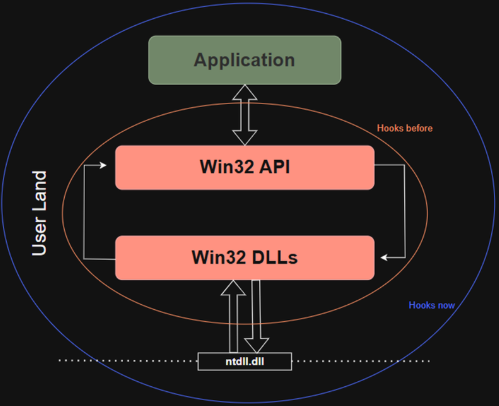
Now that we have seen how applications go through APIs and system DLLs before reaching system calls, it becomes easier to understand where security solutions intervene. Antivirus and EDR products rely heavily on a technique called hooking. The idea is to intercept specific API calls in order to analyze what an application is trying to do, and to block the action if it appears malicious.
Historically, these products mainly focused on common Win32 functions such as OpenProcess or CreateRemoteThread, since they are frequently abused by malware for code injection, process manipulation, or privilege escalation. However, attackers quickly adapted. Instead of using the Win32 API, they started calling native functions exposed by ntdll.dll directly. By doing so, they could bypass the Win32 layer entirely and avoid many user-mode hooks.
In response, security vendors expanded their visibility. Modern AV and EDR solutions now hook not only Win32 API functions, but also native API calls, and in some cases monitor system call activity itself.
The goal remains the same: stay positioned between the application and the kernel, where sensitive operations can be inspected, correlated, and potentially blocked before they are actually executed.
As a result, modern EDRs operate across multiple layers (Win32 APIs, native functions, and user-to-kernel transitions) to maintain effective detection and prevention capabilities.
3. Reversing the Win32 API with a simple example#
This section is based on a binary sample taken from a retired Hack The Box Sherlock challenge. The goal here is not deep static reverse engineering, but rather understanding how a program actually interacts with the Win32 API at runtime.
API Monitor and APMX files#
API Monitor is a very practical tool for observing what a Windows program really does while it runs. Its core purpose is simple: it intercepts API calls in real time and shows how a binary interacts with the operating system. You can either launch an executable directly from the tool or attach API Monitor to an already running process. It is important to note that API Monitor is not an emulator or a sandbox. If you are analyzing a suspicious binary, it must be done in an isolated environment.
One of the main strengths of API Monitor is the amount of information it provides. For each intercepted API call, it displays the function name, input parameters, return values, and even the live call stack. This makes it extremely useful for identifying injection techniques, tracking system interactions, or simply understanding the behavior of an unknown program.
Because it focuses on real execution rather than assumptions, API Monitor is an essential tool when reversing Win32-based binaries and analyzing how they leverage Windows APIs.
Understanding API monitor return value column#
When using API Monitor, one important column to understand is Return Value. This is what tells you what a function actually returned at runtime, and it is often key to understanding the program’s logic.
In the example shown here, the function lstrcmpiA is called. This function compares two strings in a case-insensitive manner. It does not count characters, instead, it performs a lexicographical comparison, character by character.
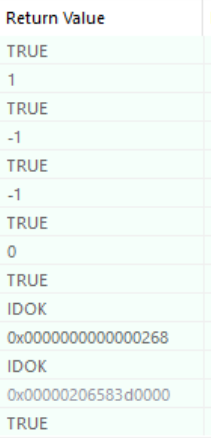
The return value for this function can take several forms:
0→ both strings are exactly identical< 0→ the first string comes before the second one alphabetically> 0→ the first string comes after the second one
Some APIs return boolean-like values:
TRUE→ the operation succeededFALSE→ the operation failed
Other return values are API-specific constants. For example, IDOK is commonly returned by dialog-related APIs and simply means that the user clicked the “OK” button.
Finally, when you see a value such as 0x00…, it usually represents a HANDLE. A handle is an identifier returned by Windows to reference an object such as a file, a process, a thread, or another system resource. This handle can then be reused by the application in subsequent API calls. Correctly interpreting return values is essential when reversing a binary dynamically, as they often directly influence control flow and decision-making inside the program.
PE architecture overview#
Since this challenge involves a Tlscallback injection, it is important to briefly revisit the Portable Executable (PE) architecture. This is a high-level overview meant to provide just enough context to understand how the technique works.
At the top of a PE file, we first find the DOS Header, followed by the PE Header. Next comes the Optional Header, which contains several Data Directories. These directories point to critical tables such as the Import Table, Export Table, Resource Table, and most importantly in this case the TLS Directory.
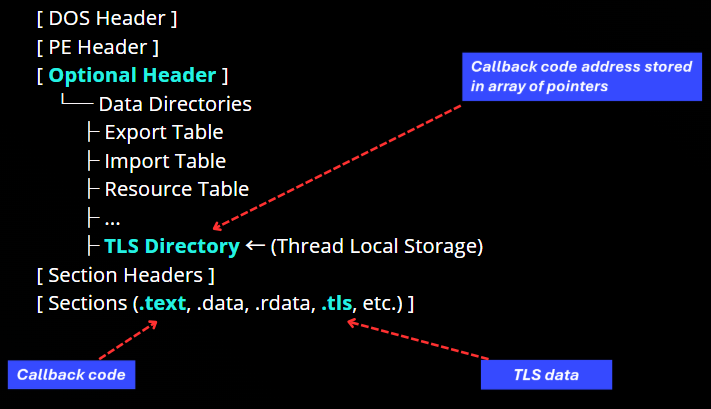
The TLS Directory is related to Thread Local Storage. It does not contain executable code itself. Instead, it stores metadata and an array of pointers to TLS callback functions. These pointers reference executable code located in standard sections such as .text.
Below this, the binary defines its Section Headers, followed by the actual sections of the executable:
.textfor executable code.dataand.rdatafor global and read-only data.tlsfor thread-local variables
During execution, the Windows loader processes the TLS Directory very early. It reads the array of TLS callbacks and invokes each function sequentially. The array is terminated by a NULL pointer. Only after all TLS callbacks have been executed does the loader transfer control to the module’s EntryPoint.
This mechanism allows code to execute before the EntryPoint, either when the module is loaded or when a new thread is created. For this reason, TLS callbacks are a powerful technique for early execution and are often used in advanced malware and evasion scenarios.
Analyze a Tlscallback injection and Win32 API calls#

When analyzing the binary in IDA, we can observe a function named TlsCallback_0. This function is usually visible either in the Exports view or directly in the list of detected functions. IDA automatically names TLS callbacks as TlsCallback_0, TlsCallback_1, and so on, after parsing the TLS Directory of the PE file. This naming convention is a strong indicator that the binary defines one or more TLS callbacks.
The presence of a TLS callback means that this function is executed automatically by the Windows loader, before the program’s EntryPoint is ever reached. The code runs as soon as the module is loaded into memory, making it an ideal place to execute early-stage logic.
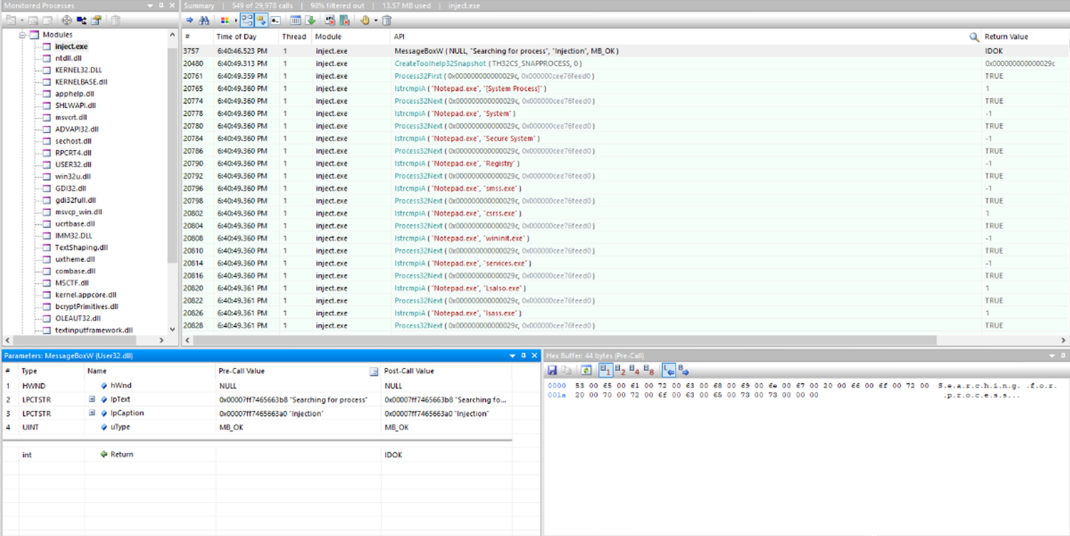
The first handle shown here, 0x29C, is returned by the CreateToolhelp32Snapshot function. This API call creates a snapshot of all processes running on the system at a specific point in time.
Just below that, we can see calls to Process32Next. The first argument passed to this function is the snapshot handle previously returned, and the second argument is a pointer to a PROCESSENTRY32 structure. This structure is filled by the API with information about the current process being enumerated, such as the process ID, executable name, number of threads, and binary size.
What API Monitor shows here is a classic process enumeration pattern:
- a snapshot of running processes is created,
Process32Nextis called repeatedly,- and at each call, the
PROCESSENTRY32structure is populated with data for the next process in the list.
For each process discovered, the program then calls lstrcmpiA, the case-insensitive string comparison function discussed earlier. The two arguments passed to this function are strings, and in this case it is clearly used to compare the process name against a hardcoded value.
From the captured calls, we can see that the program is specifically searching for the process Notepad.exe within the snapshot. This confirms that the TLS callback performs process enumeration and filtering very early during execution, before the program’s EntryPoint is reached.
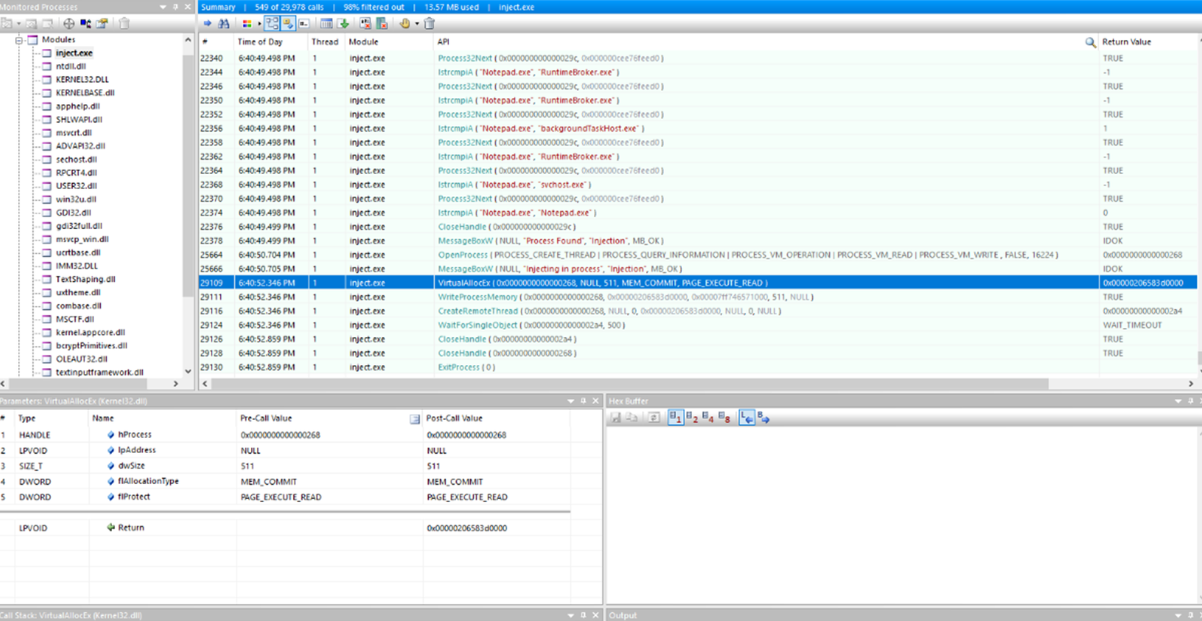
Once the return value of lstrcmpiA is 0, the program knows that the target process has been found, since both strings are identical. In this case, the comparison confirms that the current process being enumerated is notepad.exe.
Immediately after that, we observe a call to CloseHandle, using the snapshot handle as its argument. This indicates that the process enumeration phase is complete and that the snapshot is no longer needed.
Next, a call to MessageBoxW appears. As the name suggests, this function simply displays a message box on screen, likely used here either for debugging or to signal that the target process has been successfully identified.
The program then calls OpenProcess, passing a set of access rights and options. One of the notable permissions is PROCESS_VM_OPERATION, which allows memory-related operations such as VirtualAllocEx. The last argument passed to OpenProcess is a PID, which corresponds to the process ID of notepad.exe.
This PID comes directly from the PROCESSENTRY32 structure. At the moment lstrcmpiA matched the process name, the loader had already populated this structure, including the th32ProcessID field. The program simply reuses this value when calling OpenProcess.
Once a handle to the target process is obtained, the injection sequence begins. The program calls VirtualAllocEx to allocate memory inside the remote process. Immediately after, WriteProcessMemory is used to write the payload into the newly allocated memory region.
The final execution step is performed with CreateRemoteThread, which creates a new thread inside the remote process. The thread’s entry point is set to the address where the payload was written, causing the injected code to execute within the context of notepad.exe.
After launching the thread, the program waits for its completion using WaitForSingleObject, then cleans up properly by closing all remaining handles with CloseHandle. Execution finally ends with a call to ExitProcess.
This is the classic and well-known injection sequence: allocation → writing → execution → cleanup executed here from a TLS callback, before the program’s EntryPoint is even reached.
Understanding how the Win32 API interacts with user mode, kernel mode, and system internals is essential for both reverse engineering and security analysis. Through this example, we’ve seen how legitimate Windows mechanisms can be abused for early execution and process injection. Mastering these fundamentals provides a strong foundation for analyzing, detecting, and defending against modern Windows threats.
